Building the Ultimate Homelab: Performance, Security, and "Vibecoding"
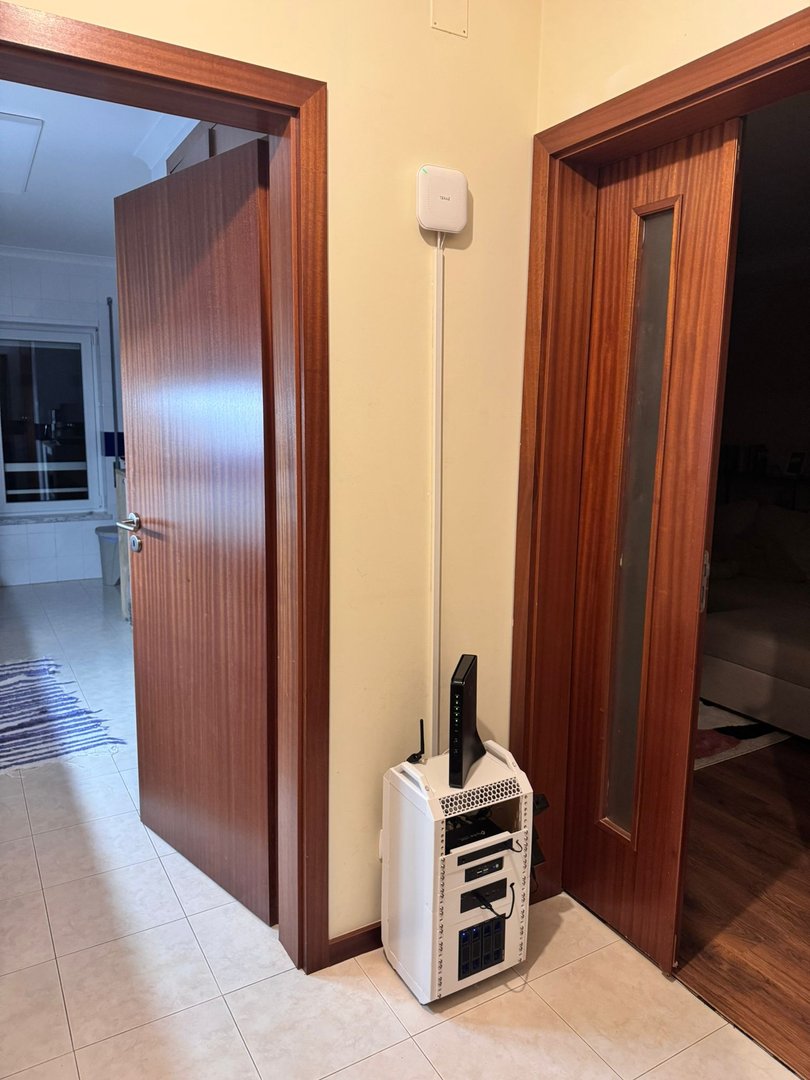
Recently, I decided to give my brother a different kind of gift: not a gadget that would be obsolete in two years, but a complete IT infrastructure. With the help of AI planning tools and a lot of network engineering, I built a High-Security Homelab.
The goal was ambitious: create a resilient environment for NAS, Personal Cloud, Home Automation, Websites, Gaming, and Development, ensuring total traffic isolation and a Zero Trust security policy.
This article documents the architecture, the hardware selection, the Wi-Fi configuration, and, most importantly, the real-world errors I faced (and solved) along the way.
1. The Hardware: The Physical Foundation
To ensure energy efficiency (the lab runs 24/7) without sacrificing virtualization performance, I adopted a split-hardware strategy.
🧱 The Firewall (PC 1)
- Model: Mini PC with Intel N100
- Specs: 4 Cores, 16GB RAM, Dual 2.5GbE LAN
- OS: OPNsense
- Why? Negligible power consumption (6W idle) and AES-NI support for fast VPN encryption.
🧠 The Server (Mini PC 2)
- Model: Mini PC with AMD Ryzen 7 5825U
- Specs: 8 Cores / 16 Threads, 32GB RAM
- Storage: Cenmate 4-Bay DAS (USB 3.0) + Seagate IronWolf NAS Drives.
- OS: Proxmox VE 9.1
- Why? Raw multithread performance to handle multiple VMs simultaneously without bottlenecks.
📡 Network Infrastructure
- Switch: 8-Port Managed Switch (TP-Link TL-SG108E).
- Wi-Fi: 2x Zyxel NWA50AX PRO (Wi-Fi 6, Mesh capable).
- Extension: Powerline Adapters (configured to carry VLAN tags to remote rooms).
2. Network Architecture: Segmentation & VLANs
The most critical part of the project was avoiding a "flat network." If a smart lightbulb is hacked, the attacker must not be able to reach the file server.
The Logic Diagram
Here is the visual representation of the physical topology, showing the flow from the ISP down to the endpoints:
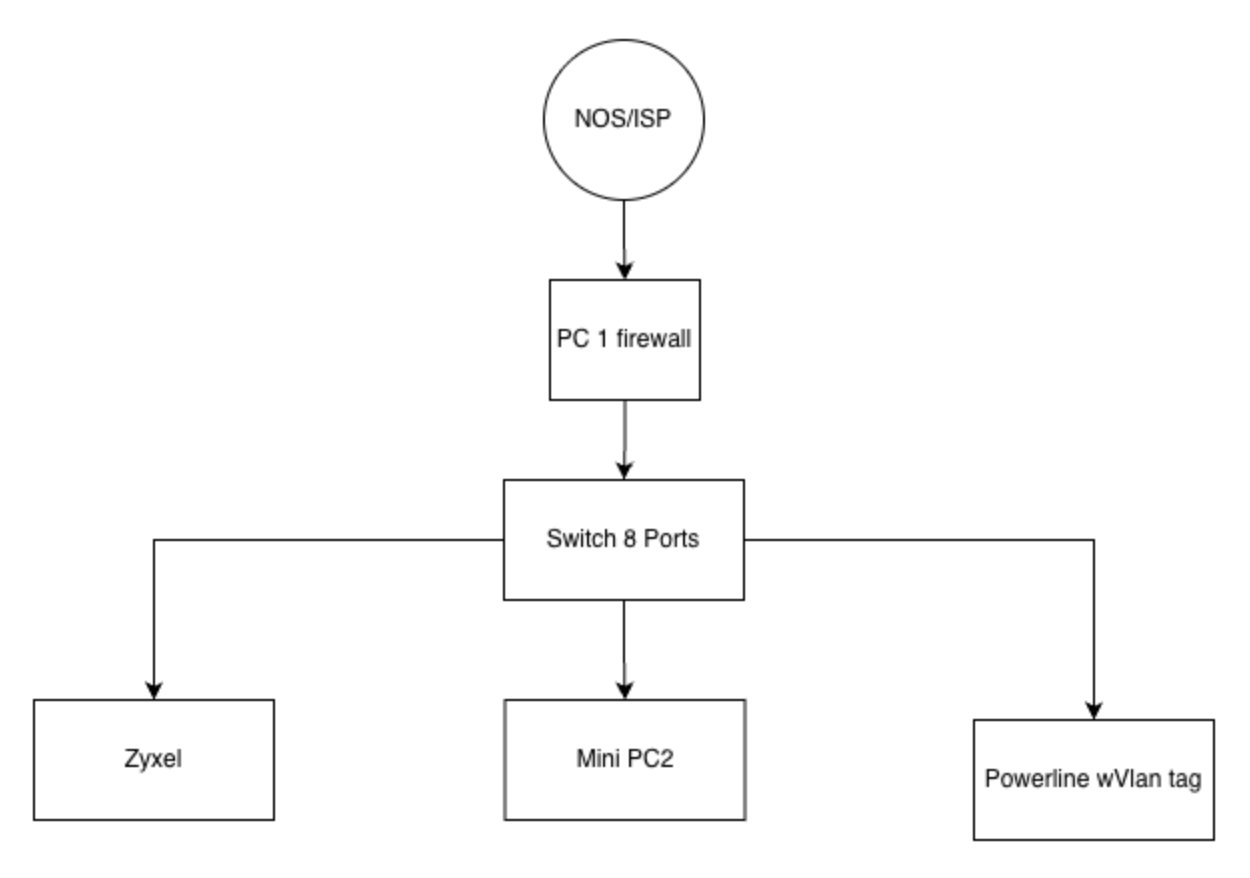
Network flow: ISP (NOS) -> Firewall (PC1) -> Switch -> Endpoints (Zyxel, Mini PC2, Powerline).
The VLAN Map (Gold Standard)
We implemented rigorous segmentation to ensure security:
- VLAN 100 (Management): Management interfaces only (Proxmox, OPNsense, Switch, APs).
- VLAN 10 (Office): Productivity computers and work laptops.
- VLAN 20 (Gaming): Gaming PCs and SimRig (QoS Priority for low latency).
- VLAN 30 (Services): Servers (CasaOS, Nextcloud, Immich).
- VLAN 40 (Main Wi-Fi): Trusted personal devices (Phones, Tablets).
- VLAN 50 (Guest Wi-Fi): Isolated internet access for visitors.
- VLAN 60 (IoT): Smart home devices (2.4GHz) restricted from the main network.
- VLAN 70 (DMZ Web): Public-facing websites isolated from the internal LAN.
Zyxel Wi-Fi Configuration (Standalone)
To reflect this segmentation wirelessly, the Zyxel APs were configured with specific SSID-to-VLAN mappings:
- Main Wi-Fi (VLAN 40):
- Profile:
SSID_Main(WPA3 Mix) - Usage: Family personal devices. Unrestricted local access.
- Profile:
- Guest Wi-Fi (VLAN 50):
- Profile:
SSID_Guest(WPA2/WPA3) - Security: Layer-2 Isolation enabled. Guests have internet access but cannot see other devices on the network.
- Profile:
- IoT Wi-Fi (VLAN 60):
- Profile:
SSID_IoT(WPA2) - Optimization: 2.4GHz band prioritized for compatibility with older smart plugs/bulbs.
- Profile:
Special OPNsense Configurations
- Bridge Mode (ISP NOS): The ISP router acts solely as a modem. The Public IP is managed by OPNsense on Port 4.
- AdGuard Home: Network-wide ad and tracker blocking.
- Gaming Friendly: Configured NAT Outbound (Static Port) on VLAN 20. Result: Open NAT on iRacing and Assetto Corsa.
- mDNS Repeater: Allows the phone on Main Wi-Fi to discover the Chromecast on IoT Wi-Fi.
3. Virtualization with Proxmox 9.1
The heart of the system runs the latest Proxmox VE 9.1. The flexibility between VMs (Virtual Machines) and LXC (Linux Containers) allowed for resource optimization.
Storage: ZFS Mirror
We configured a ZFS Mirror (RAID 1) via software in Proxmox for the USB DAS drives. This ensures protection against physical drive failure and Bit Rot.
The Self-Hosted Services
🏠 Home & Productivity (VMs)
- CasaOS (Ubuntu VM): A user-friendly visual interface for file management.
- Nextcloud & Immich: Private cloud for documents and Google Photos-style photo backup (with local AI recognition).
- Home Assistant OS: The smart home hub controlling the VLAN 60 devices.
🎮 Gaming Server (LXC)
- Crafty Controller: A dedicated container to manage Minecraft servers. It provides a slick web interface for plugin management, automated backups, and server consoles, ensuring lag-free gaming with friends.
👨💻 Dev & Vibecoding (LXC)
To keep the production system clean, development happens in isolated environments:
- Docker Projects: A "Sandbox" LXC for testing containers.
- Vibecoding Env: An environment configured with automation tools and bots, ready for late-night coding sessions without the risk of breaking critical services.
4. Remote Access: Zero Trust Security
How do we access all of this from outside without opening dangerous ports (80/443) on the router?
Golden Rule: No ports are opened on the WAN interface.
- Cloudflare Tunnels: Safely exposes websites (portfolios). The home IP is never revealed.
- Cloudflare Access: Protects critical subdomains with Email/PIN authentication before the page even loads.
- Tailscale: A Mesh VPN for administration. Allows SSH and SMB access as if we were on the local network.
- Geo-Blocking & CrowdSec: The firewall automatically blocks IPs from high-risk countries and known attackers globally.
5. Troubleshooting: Real Errors & Solutions
The most valuable part of any project is how obstacles are overcome. Here is our "War Diary."
🚀 The Mystery of 15 MB/s (Tailscale)
The Error: When transferring files remotely via Tailscale, speed was inexplicably capped at 15 MB/s.
The Fix: The issue was DNS routing.
- Solution: In the Tailscale client settings, disable "Use Tailscale DNS". Speeds instantly saturated the connection.
💾 The 200GB Crash (Nextcloud)
The Error: System crash during large backup uploads.
The Cause: The system disk filled up with temporary files, exhausting RAM.
The Solution: Expanded the virtual disk using growpart and added an emergency 8GB SWAP file.
📶 Zigbee vs. USB 3.0 Interference
The Error: Smart devices were randomly disconnecting.
The Cause: USB 3.0 ports generate electromagnetic interference (EMI) on the 2.4GHz spectrum.
The Solution: Used a USB 2.0 extension cable to physically distance the radio dongle from the Mini PC chassis.
🔒 Error 400 Bad Request
The Error: Nextcloud refused connections coming through the Cloudflare Tunnel.
The Solution: Strict configuration of trusted_proxies in config.php and forcing protocol overwrite:
'overwriteprotocol' => 'https',
'forwarded_for_headers' => ['HTTP_X_FORWARDED_FOR'],
6. FAQ
Q: What is the power consumption?
A: The entire setup (2 Mini PCs, Switch, drives) draws approximately 45-50W, making it very cost-effective for 24/7 operation.
Q: Does the Ryzen handle transcoding?
A: Yes, the Ryzen 7 5825U easily handles 4K to 1080p transcoding for Jellyfin/Plex without needing a dedicated GPU.
Q: What happens if the house loses power?
A: The BIOS on both Mini PCs is set to "Power On" after AC recovery. The ZFS file system checks itself for integrity upon boot.
Conclusion
This homelab is proof that you can have enterprise-grade infrastructure at home with low power consumption and high security. My brother now has total control over his data, a robust gaming platform, and an isolated development environment.
The hardware is set, the software is configured. Now, it's just about maintenance and scaling.
Have questions about the OPNsense configuration or the network diagram? Drop a comment below!